

Zero-Based Budget Template for Excel Beginners (Free)

Last fact-checked: · Editorial standards
Zero-based budgeting sounds technical, but the whole idea fits in one sentence: give every dollar a job until you have zero left to assign. Your income minus everything you plan to do with it should equal zero, not because you spend it all, but because even savings and debt payoff count as a job. Done in a spreadsheet, it is the clearest way to see exactly where your money goes.
The problem for most beginners is the blank spreadsheet. Setting up the columns and formulas feels like a chore before you even start. So we built the template for you. This is a simple zero-based budget template for Excel beginners, with the math already wired in, so you just type your numbers and watch the plan balance.
Below you will find the free download, a walkthrough of how it works, how to use it in five minutes, and how to build your own version if you would rather learn the formulas. No experience with Excel required.
- Zero-based budgeting means give every dollar a job until “Left to Budget” reads $0, and savings counts as a job.
- The free .xlsx above has the formulas built in, so you just type your numbers.
- Prefer to learn it? Build your own in five minutes with three SUM formulas.
- Expect a messy first month. It gets accurate by the third.
- Works the same in Excel and Google Sheets.
Reviewed and updated for 2026. Spending benchmarks come from the CFPB and the BLS Consumer Expenditure Survey.
What Is a Zero-Based Budget?
A zero-based budget is a plan where every dollar of income is assigned to a category before the month begins, so income minus all assignments equals zero. The categories include the fun stuff, the boring bills, and, crucially, savings and debt payments. Nothing is left floating, which is exactly why it works.
That last point trips people up. Reaching zero does not mean spending everything. If you earn $3,000 and plan to save $400, that $400 is one of the jobs you assign, so the math still lands on zero with money safely tucked away. The method just forces you to decide on purpose instead of wondering where it all went.
Why Zero-Based Budgeting Works So Well
Zero-based budgeting is popular for a reason: it closes the gap between what you think you spend and what you actually spend. That gap is where money quietly disappears, and assigning every dollar in advance slams it shut.
The method also taps a simple psychological truth. When money is unassigned, your brain treats it as available, and available money gets spent. Give each dollar a specific job and you create a small, useful friction, since spending from the fun category now means less fun money later, a trade you can actually see. The Consumer Financial Protection Bureau recommends building a written spending plan for exactly this reason: a plan you can see is a plan you can stick to.
Finally, zero-based budgeting is honest. It does not let a surplus hide, so you have to decide whether the extra goes to savings, debt, or fun. That single decision, made on purpose every month, is what separates people who build wealth from people who wonder where it went.
What Is in the Free Excel Template
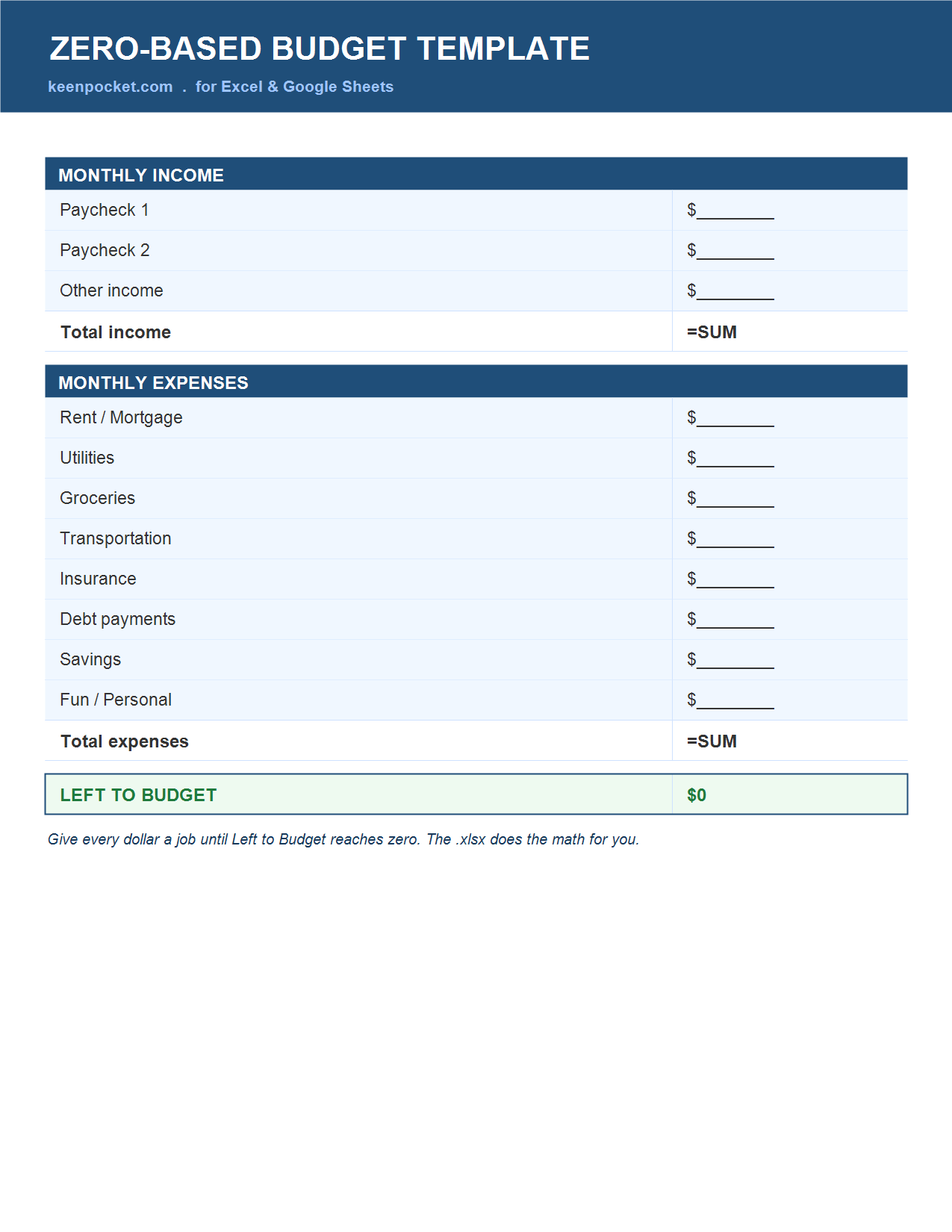
The template is built to be beginner-proof. Everything that needs a formula already has one, so you never touch the math unless you want to.
- An income section for each paycheck and any extra income.
- A Total Income cell that adds your income automatically.
- An expense section with the common categories already listed.
- A Total Expenses cell that sums everything you assign.
- A Left-to-Budget cell that shows income minus expenses, live, so you push it to zero.
How to Use the Template in 5 Minutes
If you can type a number into a box, you can run this. Here is the whole process.
- Download and open it in Excel or upload it to Google Sheets.
- Enter your income. Type each paycheck amount into the income rows. The Total Income cell updates on its own.
- Assign your expenses. Fill in what you plan to spend or save in each category, from rent to fun money.
- Watch Left to Budget. Keep adjusting the categories until that cell reads zero. Every dollar now has a job.
- Track through the month. Update amounts as real life happens, and copy the sheet fresh each month.
How to Build a Zero-Based Budget Yourself in Excel
Prefer to make your own so you understand every cell? It takes about five minutes and three simple formulas. This is the part that turns an Excel beginner into someone comfortable with a spreadsheet.
- Label two columns: Category in column A, Amount in column B.
- List income, then expenses, each in its own row down column A, with amounts in column B.
- Total your income with a formula like =SUM(B2:B4) under the income rows.
- Total your expenses the same way, for example =SUM(B7:B16).
- Add the key cell: Left to Budget equals total income minus total expenses, written as =B5-B17. When it hits zero, your budget is balanced.
How to Categorize Your Spending Without Guessing
The hardest part of a first budget is not the math, it is knowing what to put in each box. The fix is to stop guessing and look at reality.
Pull your last month or two of bank and card statements and sort every charge into a category. Patterns jump out fast, and most people discover one or two categories, often food and subscriptions, that are much bigger than they assumed. Those statements are the most honest budgeting tool you own.
If you want a benchmark, the Bureau of Labor Statistics Consumer Expenditure Survey shows how the average U.S. household splits its spending, with housing, transportation, and food taking the largest shares. You do not have to match those numbers, but they are a useful sanity check when a category feels off. Start with broad categories rather than fifteen tiny ones, since a simple budget you keep beats a detailed one you abandon. You can always split a category later once you see where the money really goes.
Zero-Based vs Other Budgeting Methods
Zero-based is not the only way to budget, and it is worth knowing where it shines. Here is how it compares to two other popular methods.
| Method | How it works | Best for | Effort |
|---|---|---|---|
| Zero-based | Every dollar assigned to 0 | Full control, tight budgets | Higher |
| 50/30/20 | Needs, wants, savings split | Simple, hands-off | Low |
| Cash envelopes | Physical cash per category | Overspenders | Medium |
A Realistic Zero-Based Budget Example
Numbers make it click. Say your take-home pay is $3,000 a month. A zero-based plan might look like this, with every dollar assigned until nothing is left.
| Category | Assigned |
|---|---|
| Rent and utilities | $1,300 |
| Groceries and gas | $550 |
| Insurance and phone | $300 |
| Debt payments | $250 |
| Savings | $300 |
| Fun and personal | $300 |
| Left to budget | $0 |
Every dollar has a home, including $300 for savings and $300 for guilt-free fun. That is the quiet power of a zero-based budget: it does not just track spending, it makes you choose your priorities on purpose, in advance.
How to Handle Irregular or Variable Income
Zero-based budgeting is often taught for a steady paycheck, but it works even better for irregular income once you flip one rule. Instead of budgeting the money you hope to earn, budget the money you already have.
Each time you get paid, treat that specific amount as the income to assign, and give those dollars jobs right then. In a lean month, you fund the essentials first, rent, utilities, food, transportation, and stop when the money runs out. In a bigger month, you fill savings and get ahead on future bills before lifestyle spending creeps in.
It also helps to budget off your lowest recent month as a baseline, so the essentials are always covered, and to treat anything above that as a bonus to send to savings or debt. Over a few months this smooths out the roller coaster, because the good months quietly build a buffer that carries you through the thin ones. For freelancers and hourly workers, that buffer is the difference between calm and chaos. For the full system, see our guide to budgeting for irregular income.
Excel, Google Sheets, or an App?
The template works in both Excel and Google Sheets, so use whichever you already have open. Excel is a touch more powerful for heavy users, while Google Sheets is free, saves automatically, and syncs across your phone and laptop, which many beginners prefer.
If you would rather not touch a spreadsheet at all, a budgeting app can run a zero-based plan for you with automatic bank syncing. Our roundup of the best budgeting apps covers the options, and several are built around this exact every-dollar method. The spreadsheet simply gives you full control and costs nothing.
The One Cell That Makes It Work
Most budget templates are just spending trackers with a nicer font. They record where money went, which is useful but passive. What makes a zero-based budget different, and genuinely more effective, is a single cell: Left to Budget.
That cell is a forcing function. As long as it shows a positive number, the budget is telling you that some of your income has no assignment, which is precisely the money that disappears in real life. You are not finished until it reads zero, so the template quietly pushes you to make a decision about every last dollar, including the boring but crucial ones like savings and debt. A plain expense tracker never asks you to do that.
This is why the same person often saves more with a zero-based sheet than with a fancier app: the discipline is built into the math, not left to willpower. Watch the Left-to-Budget cell, drive it to zero every month, and the template does the hard part of budgeting for you, which is deciding on purpose instead of by default.
Common Zero-Based Budgeting Mistakes
- Forgetting irregular bills. Annual costs like insurance sneak up. Add a line and set aside a twelfth each month.
- Leaving no fun money. A budget with zero flexibility gets abandoned fast. Assign a small amount to enjoy.
- Not counting savings as a job. Savings is a category, not leftovers. Assign it first, before it disappears.
- Quitting after one messy month. The first month is always rough. It gets accurate by the third.
Your First Month With a Zero-Based Budget
The first month of any new budget is the messy one, and knowing that in advance keeps you from quitting. Here is what a realistic first month looks like.
Week 1: You build the plan from your statements, assign every dollar, and get Left to Budget to zero. It feels great, and it is also a guess.
Week 2: Reality pushes back. Groceries run higher than you assigned, so you move money from another category to cover it. That is not failure, it is the budget working, showing you a real number instead of a hoped-for one.
Week 3: You spot a subscription you forgot and a bill that was bigger than planned. You adjust, and the plan starts to match your actual life.
Week 4: The categories settle. You now have a far more accurate template for next month, built on real data instead of optimism. By the third month, most people find their zero-based budget is close to accurate and takes only a few minutes to update. The first month buys you that accuracy, so push through it.
How to Stick With It After Month One
A budget only helps if you keep using it, and a few small habits make a zero-based budget stick long after the initial motivation fades.
Set a standing 20-minute money date, once a week or on payday, to update the sheet and reassign anything that drifted. Keeping the ritual short and regular matters more than doing it perfectly. Automate what you can, sending savings and fixed bills out on a schedule, so fewer dollars need active managing each week.
Finally, copy the sheet fresh each month rather than editing the old one, so you build a running history you can look back on. Watching three or six months of budgets line up is genuinely motivating, and it turns a chore into visible progress. The goal is not a perfect budget. It is a budget you actually keep, month after month.
Where a Zero-Based Budget Fits
A zero-based budget is the engine, but it works best alongside a few other habits. Once every dollar has a job, the next step is making sure the important jobs actually happen.
Send the savings line to a high-yield savings account so it grows while it waits, and if a category is for irregular bills, a sinking fund tracker keeps it organized. If you are paid biweekly, our guide on sinking funds with biweekly paychecks shows the per-paycheck math. New to budgeting overall? Pair this with our budgeting tips for beginners and the printable budget planners for a paper option. Prefer software? Compare the best budgeting apps.
Frequently Asked Questions
Is this zero-based budget template really free?
Yes. The download above is a free .xlsx with the formulas built in and no email required. Open it in Excel, or upload it to Google Sheets to use it online. Copy a fresh tab each month so you keep a record.
Do I need to know Excel to use it?
No. The template already contains every formula, so you only type numbers into the labeled boxes. If you want to learn, the build-it-yourself section shows the three simple SUM formulas that make it work.
What does “zero-based” actually mean?
It means you assign every dollar of income a specific job until you have zero left to allocate. Savings and debt payments count as jobs, so reaching zero means your money is fully planned, not fully spent.
Does the zero-based budget template work in Google Sheets?
Yes. Upload the .xlsx to Google Drive and open it with Google Sheets, and the formulas carry over. Everything works the same, with the bonus that Google Sheets saves automatically and syncs across your devices.
How is a zero-based budget different from just tracking spending?
Tracking looks backward at what you already spent, while a zero-based budget looks forward and assigns money before you spend it. Tracking tells you what happened, and a zero-based budget lets you decide what happens. Used together, they are powerful.
What if I have money left over at the end of the month?
In a true zero-based budget you would have already assigned it, but real months are messy. If you finish with a surplus, give it a job right away, ideally savings or extra debt payoff, so it does not quietly drift into unplanned spending.
Is zero-based budgeting good for beginners?
Yes, especially with a template that handles the math. It is the clearest way to understand where your money goes, and the discipline of assigning every dollar builds strong habits fast. Start simple, expect a rough first month, and it gets easier quickly.
Can I use this template for a family or shared budget?
Yes. Add income rows for each earner and shared expense categories, then assign the combined total to zero together. The template handles any number of income and expense lines, so it scales from a single person to a whole household.
How often should I update my zero-based budget?
Build it once at the start of each month, then spend a few minutes each week reassigning anything that drifted. Copy a fresh sheet monthly so you keep a clean record and can compare your plan to what actually happened.
The Bottom Line
A zero-based budget is simply the practice of giving every dollar a job until nothing is left unassigned, and a spreadsheet makes it easy to see. Grab the free zero-based budget template for Excel beginners above, type in your income and expenses, and adjust until Left to Budget reads zero. Or build your own in five minutes with three SUM formulas. Either way, you walk away knowing exactly where every dollar is going, which is the whole point of a budget in the first place.

Sarah Whitman is the founder and lead editor of Keen Pocket. She holds a BS in Accounting and Finance and writes plain-English guides on budgeting, saving, debt, and beginner investing.